Knigorad - Read Novels & Books
- 4.3
- Rating
- 500.00K
- Installs
- Free
- Price

 Analysis by App-foxy
I installed Knigorad expecting a straightforward way to browse digital fiction, and that is the right starting point for understanding it. This free Books & Reference app from Moboreader Technology USA Co Ltd is aimed at readers who enjoy romance, fantasy, and webnovels that develop through frequent updates. It is less like a traditional ebook shelf and more like a constantly moving reading catalogue, where the appeal comes from discovering an ongoing story and returning to it regularly.
My first impression was that the app makes sense for someone who reads in short bursts. If you have ten minutes while commuting, waiting for an appointment, or winding down before bed, a serialized novel can be easier to pick up than a long standalone book. The experience is built around finding something that catches your attention, reading a portion, and deciding whether you want to continue with that story or try another one.
That focus also explains its limitations. I would not choose it as my main tool for academic reference, serious nonfiction, or managing a carefully organized personal ebook library. Its strongest identity is mobile fiction reading, especially for people who like emotional plots, fantasy settings, and stories that keep adding new chapters.
You May Also Like

 Blood Strike: 2.5 Anniversary
Blood Strike’s Loadouts Turn Every Drop Into a Tactical Gamble
A close look at Blood Strike’s custom loadouts: how fast access to signature weapons reshapes its battle royale rhythm, rewards preparation, and narrows the gap between fights.

 Pandora - Music & Podcasts
Pandora’s Music Is Easy to Start, but Harder to Recover
Pandora’s strength is its low-effort path from a seed to a station. Its weak spot is how much confidence it asks you to place in connection, setup, and quiet recovery.

 8 Ball Pool
8 Ball Pool Is Built on Rivalries, Rematches, and Routine
A close look at the rivalries, rematches, shared routines, and unanswered safety questions that turn a quick pool match into a persistent mobile community.

 Samsung Music
Samsung Music’s Quiet Strength Is Playing What You Already Own
Its reach comes less from spectacle than from dependable access to a personal library. That simplicity is both the app’s strongest retention engine and its ceiling.

 AccuWeather: Weather Radar
AccuWeather Review: A Quick, Clear Forecast for Everyday Decisions
For everyday plans, the best forecast is the one you can understand quickly. AccuWeather makes rain timing, radar, and local conditions easy to act on, with a few trade-offs.

 Hill Climb Racing
Why Hill Climb Racing Still Turns Crashes Into One More Run
A tiny car, a bumpy hill and one more upgrade: Hill Climb Racing keeps resurfacing because its simple chaos makes every near-miss feel personal.
More From Our News Desk



Getting started without feeling lost
I find it easier to settle into a fiction catalogue when I treat the first visit as a small experiment, not a hunt for the perfect book. In this section, I look at how to choose an opening story, set expectations for mature material, and build a routine that fits a real day. That first choice matters because the next question is whether the reading itself feels smooth enough to keep returning to.
What the first screen is really asking you to do
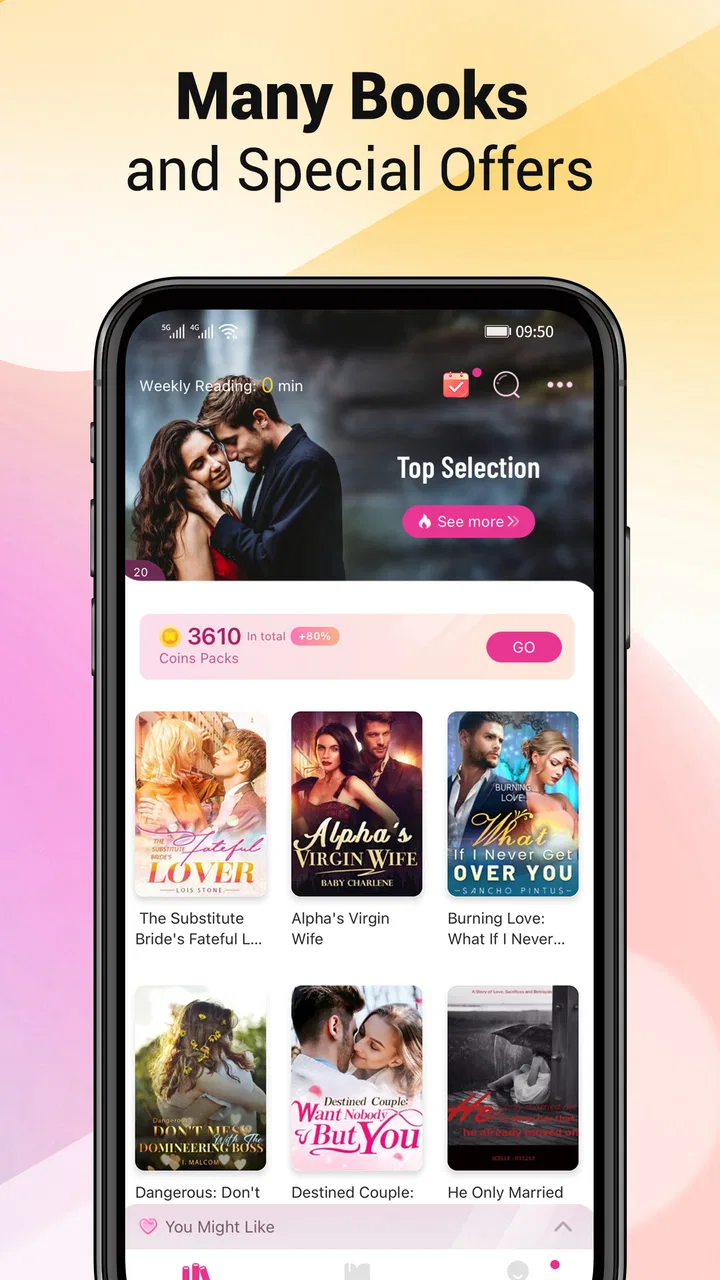
When I approach an app like this for the first time, I try not to overthink the catalogue. The most useful first move is to browse the available fiction and look for a premise that genuinely interests you. With romance and fantasy, small differences in tone matter: a slow relationship story, a dramatic family plot, and a supernatural adventure can all appear beside one another, but they serve very different moods.
I recommend choosing one story based on its opening idea rather than collecting several immediately. A large catalogue can create the illusion of progress while leaving you with a shelf full of books you have barely started. Picking one promising title gives you a clearer test of the reading flow, chapter presentation, update rhythm, and overall comfort on your phone.
The app is rated for mature audiences aged 17 and up, so I would not install it for a child or hand over a device assuming that every story is suitable for younger readers. That age guidance is particularly relevant in romance-focused catalogues, where themes and situations can vary substantially from one novel to another. I would check the description and opening chapters before recommending a specific story to someone else.
My practical setup routine
My preferred setup is simple. I first make sure I am signed in in the way the app requests, then I browse without rushing into purchases. I read enough of a story to decide whether the writing style and pacing suit me, and only after that do I think about continuing it. This order matters because the excitement of a dramatic opening can make almost any title feel essential for a few minutes.
I also suggest deciding where this app fits into your reading routine. If you want a quiet bedtime reader, lower the screen brightness and choose a story with a pace you can comfortably follow in short sessions. If you read during breaks, keep your expectations realistic: a webnovel may end a chapter at a particularly dramatic point, and you may find yourself spending longer than planned to reach a satisfying pause.
One useful habit is to keep a small mental note of the stories you have actually enjoyed, rather than relying on the catalogue to do all the remembering for you. This is especially helpful when you sample several genres. Romance and fantasy often use familiar themes, and after a while it can be surprisingly easy to confuse one title’s characters or plot setup with another’s.
Finding the first meaningful reading win
For me, the first successful action is not simply opening a book. It is finding a story that makes me want to return after the first reading session. I judge that by three things: whether the opening establishes a clear reason to care, whether the chapter length fits the time I have available, and whether the ongoing format feels exciting rather than incomplete.
That last point is important for newcomers. A webnovel may be designed to unfold over repeated updates instead of delivering a complete experience in one sitting. If you prefer a finished novel with a carefully controlled beginning, middle, and ending, the format may feel frustrating. If you enjoy anticipation and like discussing what might happen next, the same structure can become the main attraction.
In an everyday scenario, imagine that I have a short lunch break and want something more absorbing than scrolling through social media. I open the app, return to the story I selected, read a chapter or two, and stop when I reach a natural pause. The next day, I do not need to search the entire catalogue again; I continue with the same story and gradually build a routine. That is where the app becomes useful rather than merely decorative on my phone.
How daily updates change the reading habit
The promise of frequent updates is appealing, but it changes the way I evaluate a novel. I am not only asking whether the current chapter is good. I am also asking whether the story gives me enough momentum to come back later. A strong cliffhanger can make the app feel lively, while too many abrupt pauses can make reading feel like a sequence of interruptions.
My advice is to treat updates as an optional rhythm, not an obligation. You do not need to check constantly or follow every new release. A better approach is to read when you have time and let several chapters accumulate if the constant waiting starts to reduce your enjoyment. This makes the serialized format feel more like a personal reading schedule and less like a notification-driven task.
Another non-obvious trade-off is that an ongoing story can be easier to abandon than a printed book. With a physical novel, the remaining pages create a visible commitment. In an app catalogue, another attractive cover is always nearby. I found it more satisfying to finish a meaningful section of one story before sampling something else, especially when the plot was still establishing its characters.
Understanding the reading experience and its friction
For me, the key trade-off is that a serial-fiction app can make discovery feel lively while also making access and spending decisions more noticeable than in a conventional ebook reader. I’ll look at how to compare the format with a personal library, handle purchase prompts thoughtfully, and decide whether an unfinished story suits your habits. Those practical frictions shape who will enjoy the app most.
Why it feels different from a normal ebook app
A conventional ebook reader usually starts with books you already own or have deliberately purchased. Knigorad starts with discovery. That distinction affects the whole experience: instead of importing a personal library and organizing authors, I spend more time deciding what to read next. The app is therefore closer to a fiction platform than to a neutral document reader.
Compared with a general bookstore app, the advantage is focus. I do not have to filter through textbooks, biographies, cookbooks, and unrelated formats before reaching romance or fantasy fiction. Compared with a standard reading app, the trade-off is less control over the overall library experience. Readers who want to load their own files, preserve a long-established collection, or move freely between many publishers may prefer a dedicated ebook reader.
The best comparison is with other serialized fiction services. Knigorad suits readers who like browsing inside one focused environment and following stories over time. A different service may be better if your priority is a large selection of completed mainstream books, ownership of individual titles, or a reading system built around public-domain and imported files. I would choose based on reading habits rather than assuming one format is automatically superior.
Handling the free-to-install model
The app itself is free to install, which makes trying it low-risk in the ordinary sense. However, the reading experience can include optional purchases ranging from under a dollar to more than two hundred dollars for an individual item. I would pay close attention to any purchase screen and decide in advance how much I am comfortable spending on a story.
This is not a criticism of serialized fiction by itself, but it is a real part of the decision. A reader who likes sampling stories casually may be happy to stay within freely available material. Someone who becomes deeply invested in one ongoing novel may encounter stronger pressure to pay for continued access or convenience. I would never begin reading without understanding what action a button is asking me to take, particularly when I am caught up in a cliffhanger.
A practical approach is to separate enthusiasm from spending. First decide whether the characters, writing, and pacing have earned your continued attention. Then consider whether paying improves your experience enough to justify it. If the financial side makes reading stressful, a library app, a subscription with a clear fixed cost, or a collection of completed free ebooks may be a better match.
What the version and device requirements mean
The current version is 6.1.5, and the app supports devices running Android 7.0 or later. That makes it accessible to many older Android phones, although compatibility on paper does not guarantee that every device will feel equally comfortable. Reading is generally forgiving of modest hardware, but screen size, battery condition, and how smoothly the phone handles app switching can still affect long sessions.
I would install it on the phone I actually use for reading rather than a spare device that I rarely carry. The value of an ongoing fiction app depends on being able to return to a story naturally. If the app lives on a tablet at home but I mostly read during travel, I am less likely to maintain the habit. Conversely, a larger screen may be preferable if small text causes eye strain.
Before committing to a long reading session, I would also test the basics: open a story, move between chapters, leave the app, and return later. That short test tells me more about whether the app fits my routine than a quick glance at its catalogue. It also gives me a chance to notice any account or navigation steps while I am still exploring rather than deeply invested in a plot.
A few common points of confusion
The first confusion for many readers is the difference between discovering a story and having unrestricted access to every part of it. A title can look available in the catalogue while later chapters involve a different reading condition. I recommend treating the opening as a trial and checking the next step calmly before assuming the entire novel follows the same arrangement.
The second is the meaning of an update-based story. New chapters do not necessarily mean that a novel is close to ending. If you need a complete book tonight, choose a finished title where possible or use a traditional ebook source. If you enjoy waiting and speculating, ongoing publication can be a benefit rather than a problem.
The third is confusing a personal recommendation with a universal one. A dramatic romance that kept me reading may be uncomfortable for someone who dislikes mature themes. A fantasy series that works in short chapters may feel too slow to someone who prefers dense world-building. I would use the opening pages and the story description as a compatibility check, not just the cover or genre label.
Another point worth remembering is that a high overall rating does not tell me whether a particular novel matches my taste. The app has an average rating of 4.3 from around two thousand ratings, and it has passed half a million installs, which suggests that many readers find value in it. Still, those broad figures cannot replace trying a story for myself. The catalogue’s variety is both its strength and the reason individual titles need personal judgment.
Who will get the most from it
I would recommend Knigorad to readers who enjoy romance and fantasy, like discovering unfamiliar webnovels, and do not mind reading stories in installments. It is especially suitable for people who want a regular source of short reading sessions instead of one book chosen weeks in advance. The app can also be a good way to explore a genre when you are not sure which author or premise you want next.
It is less suitable for readers who want only completed novels, dislike mature content, or need a predictable one-time price before they begin. It is also not my first choice for anyone searching for reference material, professional research, or a universal ebook library. In those cases, a library service, bookstore reader, or document-focused app will usually offer a more appropriate structure.
I would be cautious about recommending it to a reader who tends to spend impulsively when a story becomes suspenseful. The combination of ongoing chapters and optional item purchases can make it easy to decide emotionally rather than deliberately. Setting a personal budget before reading is a simple safeguard, and it keeps the app enjoyable instead of turning every cliffhanger into a spending decision.
My next-step workflow after the first session
After testing one story, I would not immediately judge the whole app from a single chapter. I would try one additional title in a different style, perhaps moving from romance to fantasy or the other way around. This reveals whether I like the catalogue broadly or only happened to find one appealing premise. It also helps separate a story-specific issue from the app’s general reading experience.
Once I find a title I want to follow, I would make the reading routine deliberately small: one chapter during a daily break, or a short session before bed. That keeps the app from becoming another endless feed. If I reach a point where the story feels repetitive, I would pause rather than paying automatically or forcing myself to continue. Returning later with a fresh mood is often more useful than treating every update as mandatory.
I would also decide how I want to handle unfinished stories. Some readers enjoy following several at once, while I prefer keeping one main story and one backup. The two-track approach works well when the primary novel reaches a waiting period or loses momentum, but it avoids the confusion that can come from juggling too many character lists and plotlines.
For readers concerned about cost, my next step would be observation rather than immediate purchase. I would read the freely accessible portion, note when a purchase is presented, and ask whether I am paying for extra convenience or simply reacting to suspense. That pause is particularly valuable because the available purchase range extends from small amounts to over two hundred dollars per item. A clear personal limit makes the decision much easier.
My overall recommendation
After using it as a fiction discovery and reading app, I see Knigorad as a focused option for a very specific kind of reader: someone who wants romance, fantasy, and webnovels in a mobile, update-oriented format. Its free entry point and focused catalogue make it easy to test, while its mature rating and optional purchases mean that first-time users should explore with a little awareness rather than tapping through automatically.
I like the way it can turn a few spare minutes into a continuing reading habit. I also appreciate that it does not require me to know exactly which book I want before opening it; browsing is part of the experience. The main compromise is control. Compared with a conventional ebook reader, I have less of a sense that I am managing a permanent library and more of a sense that I am participating in an evolving fiction feed.
My final advice is straightforward: install it if you enjoy serialized stories and are comfortable judging each title on its own. Start with one novel, read enough to test the writing and pacing, and understand the purchase prompt before continuing. Skip it if you want completed books, imported files, reference material, or a completely predictable reading cost. For the right reader, it is an engaging way to discover ongoing fiction; for everyone else, a traditional ebook or library app will likely feel calmer and more dependable.
FAQs for Knigorad - Read Novels & Books
01What is Knigorad - Read Novels & Books?
Knigorad - Read Novels & Books is a mobile reading app designed for people who enjoy novels, stories, and other digital books on their Android or iOS device. It provides a convenient way to browse available titles, open books, and continue reading from a phone or tablet. The exact catalog, reading tools, and availability may vary depending on your region and the current version of the app.
02Is Knigorad - Read Novels & Books free to download and use?
The app may be available to download at no initial cost, but that does not always mean every book or feature is completely free. Some content can require in-app purchases, a subscription, registration, or another form of access. Before downloading or starting a book, users should check the store listing and the app’s payment information carefully, especially if the application offers premium novels or additional reading benefits.
03Does Knigorad work offline?
Offline reading depends on the features supported by the current version of Knigorad and on whether a specific book can be saved to the device. In many reading applications, titles must first be opened or downloaded while an internet connection is available. Users who want to read while traveling should test the download option in advance and confirm that saved books remain accessible without mobile data or Wi-Fi.
04What kind of books and novels are available in Knigorad?
Knigorad focuses on digital reading, with its selection generally centered on novels, serialized stories, and other book content. The available genres, languages, authors, and publishing sources can change over time, so the catalog may not be identical for every user. Readers should explore the categories and search tools after installation to confirm whether the app offers the genres and language they prefer.
05Is Knigorad safe and suitable for all readers?
As with any app that provides user-facing digital content, readers should download Knigorad only from an official Google Play or Apple App Store listing and review the developer information, permissions, privacy policy, and recent user feedback. Book content may include mature themes depending on the catalog, so the app may not be appropriate for children. Parents should check age ratings and available controls before allowing access.
Pros
- Large selection of novels across multiple genres and reading interests.
- Simple interface makes browsing and opening books quick and convenient.
- Personal library helps keep favorite titles organized in one place.
- Reading progress makes it easy to return to your last position.
- Suitable for discovering independent and lesser-known authors.
Cons
- Book availability and catalog size may vary by language or region.
- Some titles may require an account
- subscription
- or in-app purchase.
- Reading quality can differ between professionally edited and user-uploaded books.
- Offline reading options may be limited for certain titles or account types.
- Frequent notifications could become distracting for users who prefer quiet reading.

Knigorad - Read Novels & Books
Gallery